
Set up your rates payments your way – and be in to win
Payble gives you greater flexibility to manage your rates payments. It’s simple to use and makes staying on top of your rates easier.
When you start a new Direct Debit or create a payment plan in Payble, you'll automatically go in the quarterly draw to win a $500 rates credit.
If you already pay your rates by direct debit, we encourage you to register and set this up in Payble. This will automatically replace your previous direct debit and include you in the draw.
Our first randomly-drawn winner in August 2026 is in Alicetown. Get set up in Payble before 24 November to be eligible for the next quarterly draw. The sooner you set up your payment plan, the more chances you'll have to win.
See Terms and Conditions and Privacy statement
Video description: See how to make payments or set up a flexible payment plan on Payble.
Our new online payment platform gives you the flexibility to manage rates payments to suit you. It’s quick and easy to:
- Choose how you pay – full or part payments
- Decide what day to make your rates payments (for example to align with your pay day)
- View balances and upcoming payments
- Set up a personalised payment schedule
- Access and update your payment information any time and anywhere
Make one-off payments
Make one-off payments towards your rates at any time. You can choose to pay the full amount or make payments throughout the year.
Flexible payments
Schedule weekly, fortnightly or monthly payments throughout the year to pay your rates. This is the most flexible option – you can choose which day to pay, skip a payment if needed or pay early.
Autopay
Schedule four payments throughout the year to be paid before or on each instalment due date.
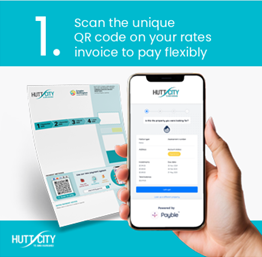
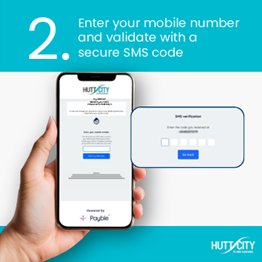
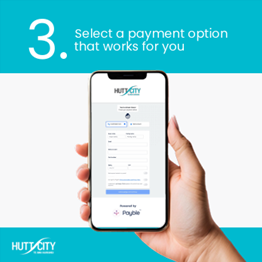
Or instead of using the QR code, visit the Payble website to pay your rates or set up a payment plan.
Frequently Asked Questions
Setting up your payments is easy. Your rates invoice has a personalised QR code – scan it to set up and manage your rates payments on your phone or computer. We’ll ask you for your mobile number or email so we can send confirmations and ensure your payment is allocated to your property correctly.
Once your mobile number or email is confirmed you can:
- Choose how to pay by selecting one of three options (one-off payment, autopay or flexible payment)
- If you select flexible payment, choose a schedule that works for you (weekly, fortnightly or monthly)
- Enter your payment details
- All done! You’ll get a text or email to confirm your payment schedule and when there are changes to your account
How to set up without the QR code
- Visit pay.huttcity.govt.nz and enter your mobile number or email address
- Put in your rates number and verification number. Both are found on your rates notice

If you’re currently set up on a direct debit plan, there is so much more available on the new online payment platform. It’s simple to switch over and unlock the benefits, including much more visibility and control over your payments. Once you sign up in Payble, we’ll take care of sorting your old direct debit payments to ensure a smooth transition.
If you’re currently paying your rates by automatic payment (you’re putting money into our bank account), you’ll need to cancel any upcoming payments and then sign up in Payble.
Direct Debit Authority 0302091 – Terms and Conditions
1. Authority acknowledgement
I confirm that this authority is subject to:
- The terms and conditions relating to my bank account, and
- The terms and conditions that relate to this authority, including the conditions below relating to notices and disputes for paperless authorities.
I agree that this authority is subject to my bank’s terms and conditions that relate to my account, and the terms and conditions listed below.
2. Specific conditions relating to notices and disputes
1) The Initiator must give me at least two days’ notice prior to each direct debit, provided that where the direct debit is part of a series, the Initiator is only required to provide two days’ notice prior to the first direct debit in the series.
2) Changes to the amounts or dates of a series of direct debits require 10 days prior notice to me.
3) I may agree with the Initiator to receive same day notice for direct debits specifically requested by me.
4) All notices must be in writing but may be delivered electronically if I have agreed to that with the Initiator.
5) I may ask my bank to reverse a direct debit up to 120 days after the debit if:
- I did not receive proper notice of the amount and date of the direct debit, or
- I received notice, but the amount or date differs from the notice.
6) If a direct debit is dishonoured and the Initiator retries it within five business days of the original direct debit, I understand that the Initiator does not need to notify me again about that direct debit.
Payble lets you choose how and when you pay. Payments can be set up from a bank account, debit card or credit card. You can:
- Make a one-off payment
- Request an extended payment plan – submit a request for weekly, fortnightly or monthly payments that suit your budget to be considered by Council.
- Autopay – pay the invoice in full. Set up a payment of your current and future rates invoices in full on the due date.
- Flexible payments – set up a direct debit to make weekly, fortnightly or monthly payments over the current rating year.
- You will get a reminder before each payment is deducted.
- You can check the balance owing on your rate account at any time.
- When you receive your first rates notice for the next financial year (in August each year), a new payment plan will be calculated automatically.
To make changes to your payment method or schedule, simply scan the QR code on your rates notice, or visit the Payble website and use your mobile phone number or email address to log in.
- Click your account icon to view existing payment plans. Add the new card or bank account and then remove the old account or card
- To change an account, select the account, choose the relevant item from the Options menu and follow the prompts
- To skip a payment, select your payment plan and choose “Skip Next Payment” from the Options menu. Payble will automatically adjust the payment schedule based on the balance owing
You will receive confirmation of any changes made to your account.
Yes. When viewing your plan, a “Pay early” button will appear next to the next upcoming instalment. In the “Manage” options, you can also select “Pay Remainder.”
Once a payment plan is completely paid for the financial year, it does not become inactive. It will move from your Active Plans list to Others, and restart in the new financial year once the new rates have been loaded into Payble.
No, all other payment methods are still available. Payble is an option that will allow you to have greater flexibility and control of your rates payments.
Yes, you can have multiple properties with their own payment schedules under one Payble account.
If you are no longer the ratepayer for a property, you need to cancel your payment plan in Payble before property settlement.
Yes. You can set up a Payble payment plan using a joint bank account.
Most personal joint bank accounts in New Zealand allow each account holder to transact independently. If this applies to your account, you can confirm this during sign-up by selecting that you have authority to operate the account.
Note: The wording of the agreement “I confirm I have sole authority on the nominated account” can be confusing. This is a bank mandated agreement and terminology. It does not mean this customer is the only individual who has authority to approve transactions. Rather, it means the customer as a sole person has authority to use the account (and so soes the other account holder).
Payble is not an option for these types of bank accounts. Instead, please complete a direct debit authority form and return it to rates@huttcity.govt.nz. You will be notified once your direct debit is set up.
When you make a payment to Hutt City Council or set up a payment plan through Payble, you may provide payment details such as bank account, credit card, or debit card information (your "Payment Methods"). Keeping this information secure is our top priority.
Secure storage of Payment Methods
The relevant Payment Method (which is tokenised in the case of credit and debit card details) and the Payment Option (including any standing authority) used to make a payment to your Billers are stored securely:
- Payble only ever holds card tokens, never your raw card numbers.
- Your real card information is securely stored by council’s existing payment gateway, which already operates under bank-grade security standards.
- Tokens are useless if intercepted, as they cannot be reversed to reveal your original payment details.
All Stored Payment Methods are held securely and in accordance with Payment Card Industry Data Security Standard (PCI DSS, the mandatory global security framework for all entities that store, process, or transmit cardholder data) and otherwise as required by New Zealand law.
Payble meets all relevant New Zealand legal requirements, and is also ISO/IEC 27001 Certified and SOC2 Type 2 Audited. See Payble's full terms here: https://payble.com.au/privacy-terms
Banks process payments seven days a week. Hutt City Council only processes payments on business days (Monday to Friday, excluding public holidays).
If a payment falls on a weekend or public holiday, direct debits will be processed on the next business day. Manual weekend payments will be recorded on the day paid but processed on the next business day.
Due dates for rates remain the same. If a due date falls on a weekend or holiday, the next business day becomes the effective due date.
Get help paying your rates
If you’re having difficulty paying your rates, we can help. Contact us to discuss what support may be available to you:
- Payment plans with direct debits or postponements to suit your situation
- Rates rebate for low-income households
- Council has a range of rates remissions (reduction in rates) including for Māori land, community, sports or other organisations.